GEOD
box
Drawing legend boxes with the box command
The box command is used to draw boxes, which form the elements of the legend of a cross-section or structural sketch.
Summary
- Insertion
- Fill motifs
- Lithological patterns
- Other options
- linewidth
- linecolor
- thickness
- invert
- hidden
- rotate
Insertion
Boxes are among the usual elements of the legend of a geological cross-section. The box command allows them to be drawn and filled either with a lithological pattern using the pattern command or with a fill motif using the fill command. However, it does not directly manage labels, which must normally be displayed next to the boxes.
It should also be recalled that GEOD can draw stratigraphic logs with the log command, which provides an alternative way of building the legend.
The syntax of the box command is simple. The command is followed by 4 arguments:
box x y w h
where x and y are the coordinates of the lower-left corner of the box, w is the width, and h is the height. All these parameters are expressed in metres.
An alternative, more explicit syntax may also be used:
box x x y y width width height height
in which each numeric value is preceded by the name of the corresponding parameter.
To construct a column of boxes, as in figure 1, it is sufficient to copy and paste the instruction defining the first box and modify the y coordinate.
Labels must be drawn using a text command.
The position of the label may be adjusted manually with the mouse while pressing the command key, or, better, the instruction right * may be used in order to place the text exactly to the right of the box.
For example, for the lower box in figure 1, the following instructions are written:
  box 100 50 70 30
  text "Bajocien" right *
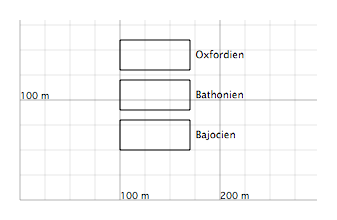
Empty boxes created by box instructions. Labels are generated by text commands.
Fill motifs
A box created by the box command may be filled with a fill motif, as described for the fill command.
All the instructions that may be used with the fill command may also be used with box. They simply have to be placed after a box x y w h instruction.
A box may also be filled using a predefined fill motif.
Since a predefined fill motif is created by the set command, one writes:
  box x y w h
      with fillName
where fillName is the name of the predefined fill motif.
This method has an important advantage: it ensures that the motifs used in the cross-section remain consistent with those drawn in the legend boxes.
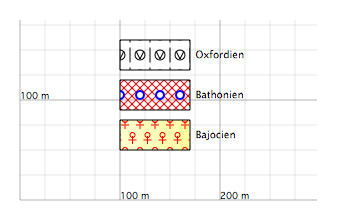
Examples of boxes filled with fill motifs.
Lithological patterns
To fill a box with a lithological pattern, a predefined pattern must be used.
  box x y w h
      with patternName
where patternName is the name of a predefined lithological pattern created by a set ... to pattern instruction.
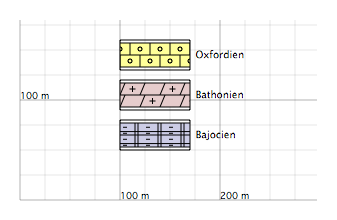
Examples of boxes filled with lithological patterns.
If, in the script, a predefined lithological pattern has the same name as a predefined fill motif, then the fill motif will always be drawn inside the box.
Other options
linewidth
The linewidth instruction sets the thickness of the line used to draw the frame of the box:
linewidth e
where e is the line thickness expressed in pixels.

Boxes drawn with variable line thicknesses. The corresponding instructions are shown next to them.
linecolor
The linecolor instruction changes the colour of the box. Its syntax is similar to that of the other colour-specification instructions. See also this section.
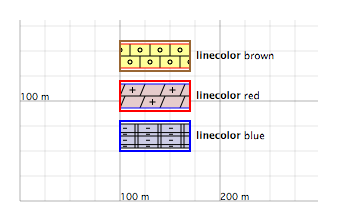
Boxes drawn with variable line colours. The corresponding instructions are shown next to them.
thickness
The thickness instruction applies to boxes filled with lithological patterns. It has no effect on boxes filled with fill motifs. This instruction adjusts the thickness of the layer drawn inside the box:
thickness e
where e is the new thickness, expressed in metres. This parameter must not exceed the height of the box.
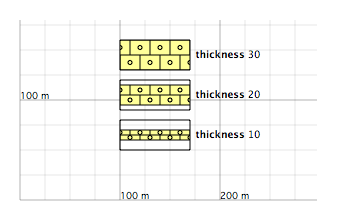
Boxes with lithological patterns. Layer thickness is controlled by thickness. The corresponding instructions are shown next to them.
invert
The invert instruction applies only to boxes filled with lithological patterns. It inverts the pattern. This subcommand takes no argument:
invert
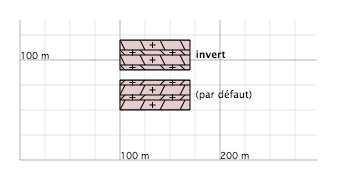
Boxes with lithological patterns. The pattern in the upper box is inverted by an invert instruction.
hidden
The hidden instruction hides the box:
hidden
rotate
The rotate instruction applies only to boxes filled with fill motifs. This subcommand rotates the motif inside the box:
rotate a
where a is the rotation angle, measured in degrees counterclockwise. The centre of rotation is located at the origin of the figure. See also this section.
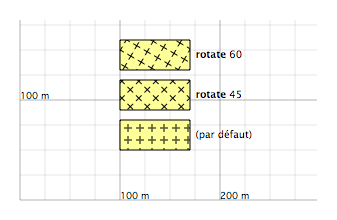
Examples of boxes with rotated fill motifs. The corresponding instructions are shown next to them.